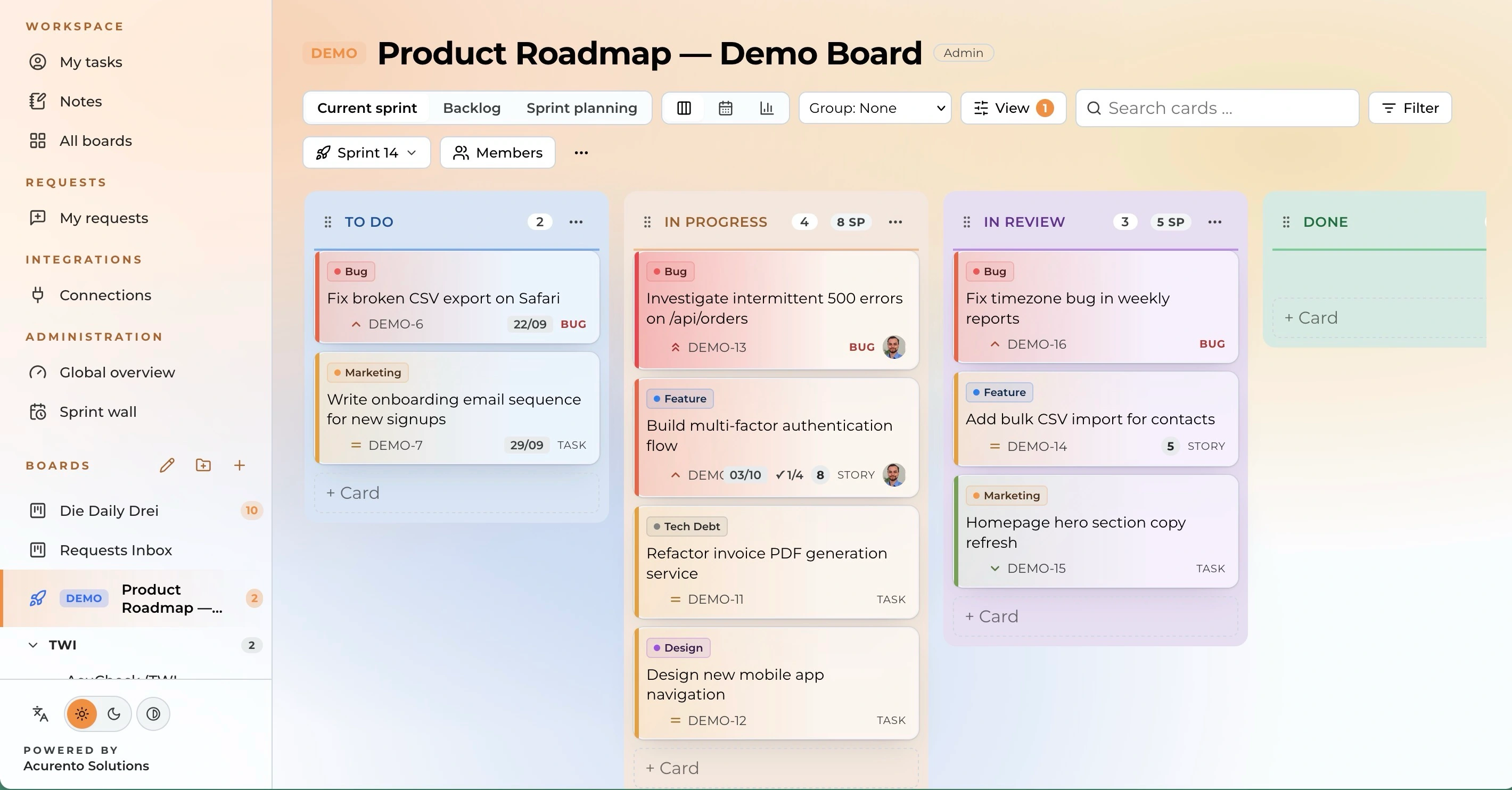
Kanban Boards, isolated. Built to replace Jira.

Org-isolated Kanban boards — a tenant of the Acurento portal. Built to replace Jira for the WP-Engineers team and their clients.
Trusted by over 70 companies














No more data silos. A powerful ecosystem.
AcuBoard is fully integrated into the Acurento portal. Boards belong to a portal Organisation, enforced by Postgres Row-Level Security.
With Single Sign-On via the portal (X-Portal-* headers), you no longer need separate logins.
What org-isolated Kanban boards do for your company
Teams use Kanban boards to keep track of tasks, sprints and projects. The challenge is rarely owning another tool. It is establishing how boards, roles and access fit your own organisation, and that differs fundamentally from company to company.
AcuBoard is the ideal foundation for multi-tenant collaboration enforced by Postgres Row-Level Security. In your personal onboarding, your workspace is set up around your organisation, and we make sure roles and access stay cleanly separated.
Only the structure that fits your organisation
AcuBoard is fully integrated into the Acurento portal and is already used by more than 70 companies across a wide range of organisational structures. That experience goes into every onboarding and gives you a board structure that fits your organisation.
So you only see the structure that is relevant to your team.
In your personal onboarding, we take factors into account such as:
- Industry
- Working style
- Sites
- Existing systems
- Integrations
- Governance
- Team size
- Workflows
Detect and track every card change continuously
A board where changes can't be traced is worth little to your team. AcuBoard logs every action automatically. Comments, status changes and assignments are recorded immediately in every card's activity log.
The system then filters the changes relevant to you and lays them out clearly in your personal dashboard, with direct access to every single card.
3 layers of traceable card history
-
01
Task
- Which task is the basis?
- What outcome is expected?
- Who is the assignee?
- Which priority and due date apply?
- Which board or area does it belong to?
-
02
Change
- What was changed?
- When was it changed?
- Which card does the change affect?
- Original source or comment
-
03
Processing by the team
- Card was viewed/reviewed
- Record a comment or assessment
- Assign a responsible person
- Processing status (column)
- Attachments or comments where needed
- Time of change
- History

This matters most when your team needs to show progress or prepare a retrospective:
- Preparation for sprint reviews
- Preparation for stakeholder reporting
- Traceable status of every card
- Change history available
- Responsibilities visible
- Activity can be checked directly
Technical quality and trust
AcuBoard was built to replace Jira for the WP-Engineers team and their clients, and has been used in daily operations ever since. Every organisation works with 100% data isolation per tenant, enforced by Postgres Row-Level Security.
The features of AcuBoard therefore mirror the daily practice of our own team.
Across Germany, more than 70 companies currently trust us for their daily collaboration in:
- Agile Development
- Scrum
- Kanban
- Sprint Planning
- Backlog
- Epics
- Subtasks
- Labels
- Checklists
- Comments
- Mentions
- Attachments
- Activity Log
- Single Sign-On
- Multi-tenancy
- Postgres RLS
- Role Management
- Saved Filters
- Notifications
- Jira Import
- HR & Recruiting
- Sales Pipelines
- Marketing Campaigns
- Construction Projects
Bring changes straight into existing workflows
AcuBoard gives you the information the way you need it. From working with more than 70 companies, we know that internal processes vary widely. AcuBoard therefore adapts to your ongoing processes and delivers notifications where they are needed.
Your personal dashboard also gives you an overview of ongoing cards, so you never miss an important change.
This is how we make sure an important card change reaches the right person exactly where they already work.
- Slack
- Microsoft Teams
Your company-specific workspace in a few steps
Getting started with AcuBoard begins with a personal consultation, where we work out together whether and how AcuBoard fits into your bundle. You then set everything up yourself directly in AcuBoard.
-
1
Book a personal consultation
You schedule a personal consultation, where we clarify your needs and put together the right AcuBoard bundle for you.
-
2
Set up your organisation and teams
Once you're confirmed, you set up your organisational structure, teams, roles and employee data yourself in AcuBoard.
-
3
Set up your boards
You set up your boards, columns and access rights yourself, to fit your organisation.
-
4
Migrate from Jira
Using our idempotent Jira importer, you migrate existing projects, cards and history yourself.
-
5
Ready right away
Once you've imported your data and set up your team, your workspace is ready for the whole organisation right away.
Get more out of every meeting.
AcuNotes is the optional companion to AcuBoard: it records meetings, transcribes them automatically, and suggests matching tickets for your boards.
Connects to Microsoft Teams and records your meetings automatically, on request.
The full transcription appears in AcuNotes right after the meeting ends.
An AI summarizes decisions, open questions and next steps automatically.
From the summary, the AI suggests matching tickets you can create on your boards with one click.
Currently available exclusively as an add-on to AcuBoard.
See AcuBoard on your own projects.
A 30-minute consultation, walked through with your projects, workflows and teams in mind.
A custom bundle offer, tailored during your personal consultation.
Hosted in the EU. GDPR-compliant. Seamless SSO authentication.
Frequently asked questions about AcuBoard
Which teams is AcuBoard suitable for?
AcuBoard is built for teams that want to manage tasks, sprints and projects in a structured, tenant-isolated way. The platform is particularly relevant for organisations moving off Jira or that need to cleanly separate multiple clients or departments.
What is AcuBoard?
AcuBoard is an org-isolated Kanban board platform. It is built to replace Jira for the WP-Engineers team and their clients, seamlessly integrated into the Acurento portal.
How does migrating from Jira work?
Our idempotent, one-time Jira importer brings existing projects, cards and history into AcuBoard in a structured way. The import can be run again safely without creating duplicates.
Do I need a separate login?
No. AcuBoard uses Single Sign-On (SSO) exclusively via the Acurento portal, so you don't need any additional login forms or passwords.
How quickly is AcuBoard set up?
After our personal consultation, we agree on the scope of your bundle and start the structured onboarding process. Once your master data is imported, the boards are ready to use.
Can I add AcuNotes to AcuBoard?
Yes. AcuNotes is the optional companion to AcuBoard: it records meetings, transcribes them automatically and suggests matching tickets for your boards. AcuNotes is currently available exclusively as an add-on to AcuBoard.
Can I map several teams or clients in one workspace?
Yes. Boards belong to a portal organisation and are strictly isolated from each other by Postgres Row-Level Security. It stays clear which boards belong to which team or client.
How is AcuBoard billed?
AcuBoard isn't sold individually online — it's tailored to your needs in a personal consultation and usually combined into a bundle with other Acurento modules. We agree on the terms together during that call.
What happens after the call?
After your personal consultation, you'll receive an offer tailored to your team. Once you accept, you get access to the onboarding portal, where you provide the initial details needed to set up your boards.
Do I get an invoice?
Yes. Once the agreement is finalised, you receive a proper invoice for your company.
How does the setup work?
Setup happens through guided digital onboarding. Personal support and data migration are discussed as part of your individual bundle and depend on the scope agreed during the call.